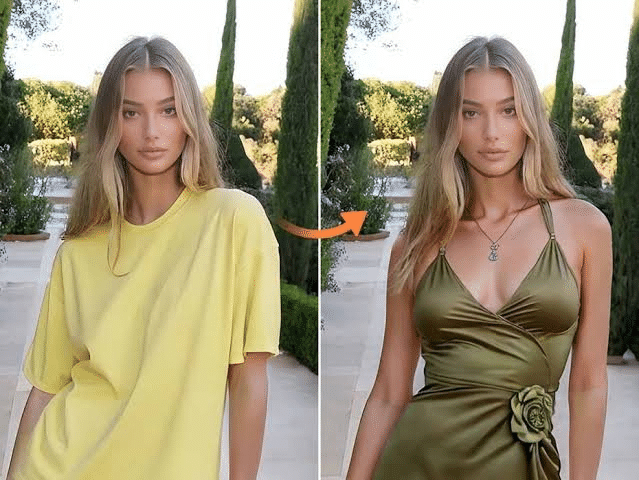
AI visual tools are no longer just for the novelty but now a regular part of work. Marketers utilize them for their ad creatives, shop owners use them to create product pages and daily users simply love to tinker with them. Vidnoz Gen gathers several of these tools in a single workspace that’s available in the browser. In this review, we examine two of them: the AI image generator which produces images from text, or images from images, and the AI outfits changer which changes clothes in an image.
Vidnoz AI Image Generator: Generate images from words and photos.
The AI image generator has three modes: Text to Image, Image to Image, and Photo Effects. A scene may be described in plain text, a photo of the desired scene may be uploaded and described in plain text, or the existing scene style effect may be applied to a photo of your own.
Key features
- Multiple AI models. It does not use a single engine, but offers the choice among multiple popular image models such as Flux Dev, Google Nano Banana, Nano Banana Pro, Google Imagen4, Z-image and Qwen. There are various models that have different looks, so it’s good to have some options when a prompt doesn’t come in first time.
- A variety of styles. These are in realistic, cartoon, 3D, artistic and retro styles. If you are looking for a stylized effect, but don’t want to write an elaborate prompt, the page offers you one-click options like a Peanuts-style cartoon, vintage mood, 3D cartoon and 50s retro illustration.
- Management of the production. You can create multiple images at once and compare versions, change the aspect ratio you are targeting (social posts, YouTube thumbnails, banners and more), and add an “unwanted content” field to filter out unwanted elements. There’s also an optional reference image to maintain consistency for a subject, face, or anything else you like.
How it works
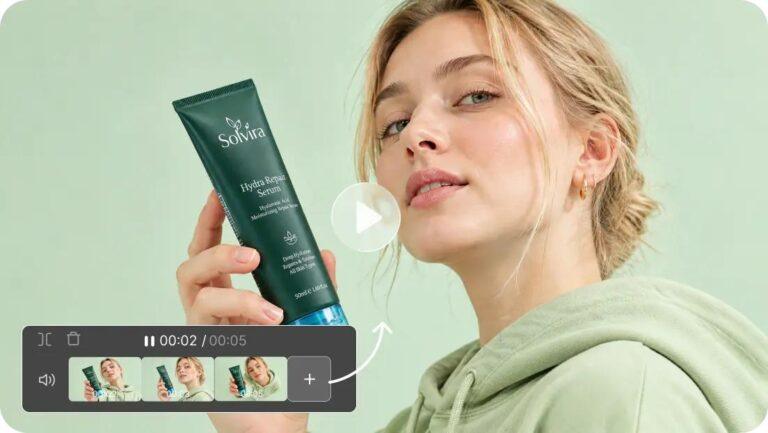
The procedure is easy to follow. Enter a prompt (in no more than 2,000 characters) or upload a picture, select the style and settings, and click on Generate Now. The tips for doing well with this tool are the same as the tool’s own suggestions: insert a descriptive title, mood/style, lighting, background, and color. Images usually load in a few seconds and once they are loaded, the images can be zoomed and shared, downloaded, edited further with the help of AI Edit, or even converted to a short video. It is ideal for social media and ad imagery, e-commerce product shots, teaching and concept art, so it’s great for small teams who don’t have a designer. Both tools are web based with no installation necessary.
Vidnoz AI Clothes Changer: You can experiment with new outfits without having to take photos.
The problem with the AI clothes changer is that you already have an image and you want someone in that image to wear something different. Rather than manually edit clothes in a photo editing software, you simply upload the photo and the AI automatically applies the new clothes to the body.
Key features
- Flexible garment areas. You can swap out just a top, shorts, pants, a short skirt or a long skirt or you can swap an entire outfit all at once.
- Virtual closet/your clothes. Select one of the pre-made styles, or upload a picture of a certain article you wish to have displayed on the model. This latter is particularly convenient for the small fashion seller who would like to “see” a new piece.
- Scenes and sizes options. There are target scenes, including a pure white studio background, and image sizes up to 2,000 x 2,000 px that are compatible with marketplaces like Amazon, Shopify, eBay and Etsy, according to the page.
- Natural fitting. Vidnoz says the software analyzes body shape and posture so the new clothes fit the person in the picture, and not stick out like a sore thumb.
How it works
This process involves three steps. Upload a photo (JPG, PNG or WEBP) that has a readily visible body. Second, select the region that you want to replace, and then pick another style or upload your own clothing image. Thirdly, hit Generate Now and wait for the outcome. Best to shoot with the subject’s eyes facing the camera, and in line with one’s body, no profile views, dim lighting or objects in the hands.
Best uses
- Virtual Try-on: see the outfits before you make a purchase or choose a style.
- Professional headshots: Use Formal Attire on a profile photo without hiring a Photographer.
- Fashion marketing: model fashion items and try out display concepts.
Applications using both the Two Tools together.
The two tools are well suited to each other. You can make a model image using the image generator and dress the model with various clothes using the clothes changer. Both also link into Vidnoz’ Image to Video feature, meaning that a completed image can be transformed into a short clip.
Pros and Cons
Pros
- No software to install, runs in the browser
- A few AI models and numerous image styles to choose from for the image generator.
- Useful controls: aspect ratio, number of outputs, negative prompts, reference image.
- Get a free daily use to try before buy.
Cons
- Features like higher resolution, no watermark and faster generation also require credits or a paid plan and free use is limited per day.
- Clothes-changer results can only be obtained for free after logging in
- The outcome of the clothes-changer depends to a large extent on the quality of the photos.
- Please read the terms of service before using commercially and only change in pictures of persons who have consented.
Final Verdict
Vidnoz provides an easy-to-use, two-tool solution. With its variety of models, styles, and settings, the AI image generator is a versatile tool that can be used by anyone looking to create images quickly and efficiently.The AI image generator offers a wide range of styles and models, making it a flexible tool for anyone looking to create images quickly and efficiently. The AI clothes changer can be a handy feature when trying on clothes virtually, for headshots and fashion marketing as long as you begin with a good photo. Both are an option for quick, inexpensive experimentation but not professional photoshoots or an expert designer in a high-stakes situation.
About the Author